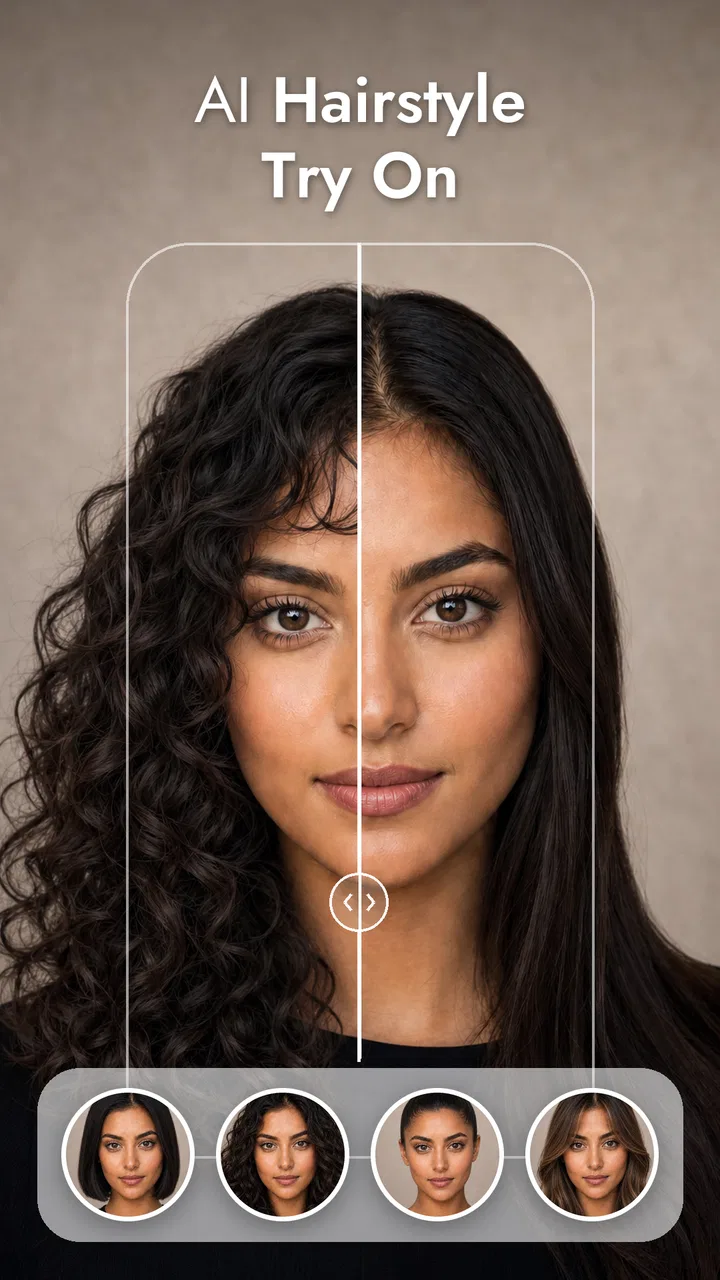
Hairstyle Try On Hair AI
- 4.2
- Rating
- 50.00K
- Installs
- Free
- Price
 Analysis by App-foxy
I approached Hair AI - Hairstyle Try On as a quick beauty tool rather than a replacement for a salon consultation. Its purpose is easy to understand: use artificial intelligence to preview different hairstyles and hair colors before making a real change. That makes it appealing when I am curious about a new look but not ready to commit to scissors, bleach, or an appointment.
My overall impression is that the app is most useful as a visual conversation starter. It can help you narrow down the kind of change you want, compare a few directions, and discover that a style you imagined may not suit your face in the way you expected. At the same time, the result should be treated as an approximation, not a promise of what a stylist can reproduce exactly.
Developed by illebra.app, this free beauty app is aimed at a broad audience and carries an Everyone age rating. It has reached over ten thousand installs and holds a 3.9 average from more than a hundred ratings, so there is enough early user activity to suggest that the concept is attracting attention while still feeling like a relatively small, developing product.
You May Also Like

 Blood Strike: 2.5 Anniversary
Blood Strike’s Loadouts Turn Every Drop Into a Tactical Gamble
A close look at Blood Strike’s custom loadouts: how fast access to signature weapons reshapes its battle royale rhythm, rewards preparation, and narrows the gap between fights.

 Pandora - Music & Podcasts
Pandora’s Music Is Easy to Start, but Harder to Recover
Pandora’s strength is its low-effort path from a seed to a station. Its weak spot is how much confidence it asks you to place in connection, setup, and quiet recovery.

 8 Ball Pool
 Is Built on Rivalries, Rematches, and Routine
A close look at the rivalries, rematches, shared routines, and unanswered safety questions that turn a quick pool match into a persistent mobile community.

 Samsung Music
’s Quiet Strength Is Playing What You Already Own
Its reach comes less from spectacle than from dependable access to a personal library. That simplicity is both the app’s strongest retention engine and its ceiling.

 AccuWeather: Weather Radar
AccuWeather Review: A Quick, Clear Forecast for Everyday Decisions
For everyday plans, the best forecast is the one you can understand quickly. AccuWeather makes rain timing, radar, and local conditions easy to act on, with a few trade-offs.

 Hill Climb Racing
Why Hill Climb Racing Still Turns Crashes Into One More Run
A tiny car, a bumpy hill and one more upgrade: Hill Climb Racing keeps resurfacing because its simple chaos makes every near-miss feel personal.
More From Our News Desk
View All News


Getting past the first points of friction
The first difficulty with an AI hairstyle app is often not the hairstyle itself. It is getting a suitable image into the workflow and understanding what the preview is actually showing. A front-facing photo with the face visible is a sensible starting point. I would avoid a picture with sunglasses, a hand covering the hairline, heavy shadows, or several people in the frame, because those details make it harder for an automated system to separate the person from the background.
Lighting matters more than many people expect. A bright, evenly lit room gives the app a better basis for interpreting the existing hair color and outline. Direct flash can be unhelpful because it may flatten texture and create bright patches, while a dark selfie can make the hair merge into the background. If the first result looks strangely placed, I would try a clearer image before blaming the chosen style.
There is also a useful difference between testing a look and documenting your current hair. For a transformation preview, a simple image is usually more practical than a highly edited portrait. Filters, strong beauty effects, and unusual angles can make the generated result harder to judge. I find it better to begin with an ordinary photo, then use a more polished image only if I want to see how the idea might look in a social profile picture.
On Android, the app requires version 7.0 or later, which covers many older devices but does not guarantee identical performance across every phone. The current version is 2.1.1. If the app opens slowly or a preview takes longer than expected, I would first close other demanding apps, check that the phone has free storage, and make sure the connection is stable if the particular generation step needs online processing.
A clean source photo is the most important setup decision. It is more valuable than repeatedly changing the same hairstyle settings on an unsuitable image. This is one of the practical lessons that is easy to miss when the store summary makes the process sound instant.
How I would prepare a useful test
I would start with one image in which the entire face is visible and the hairline is not hidden. Then I would try a modest change before jumping straight to a dramatic color or a very short cut. A subtle adjustment gives me a reference point: if the face placement and general outline look convincing, I can be more confident that a bolder experiment is worth trying.
For color comparisons, I would keep the lighting consistent. Testing one shade in a warm indoor photo and another in cool daylight can make the comparison misleading even when the app is behaving normally. If I wanted to show a stylist the results, I would save or present several previews made from the same base image, so the haircut and lighting do not change at the same time.
That workflow also helps answer a common question: can this app tell me exactly which dye or haircut to request? Not really. It can give me a visual direction, but a preview does not account perfectly for hair density, curl pattern, porosity, existing color, or the technical work needed to reach a particular shade. I would use it to say, “I want something close to this,” rather than, “Please reproduce this image exactly.”
Recovering when a preview looks wrong
When an output looks misaligned, I would not immediately assume the selected style is bad. There are several possible causes: the head may be tilted, the hair may blend into the background, the image may be cropped too tightly, or the original style may be difficult for the system to interpret. A second photo with a clearer outline is the fastest troubleshooting step.
If the app appears stuck, my basic recovery sequence would be simple: wait briefly for the current action to finish, return to the previous screen, and retry once with the same image. If that does not help, I would fully close and reopen the app, then test a different photo. Repeating the exact same failed attempt over and over is less useful than changing one variable at a time.
Changing one variable is important because it shows where the problem sits. If the same photo fails with every look, the image or processing step may be the issue. If one style fails while others work, the problem may be specific to that transformation. If a new photo works immediately, there is little reason to spend time changing phone settings.
I would also avoid judging an image while the phone is under heavy load. Other apps using the camera, video, or significant memory can make any visual tool feel unreliable. Closing them and trying again gives a cleaner test. This is ordinary troubleshooting, but it prevents a temporary device slowdown from being mistaken for a flaw in the hairstyle preview.
The app includes in-app purchases ranging from $0.49 to $19.99 per item. Because the basic app is free, I would pay attention to what is available before confirming any optional purchase and decide whether the extra result is genuinely useful for my purpose. For a one-time haircut discussion, a free preview may be enough; someone comparing many possible looks may judge additional options differently.
What the preview can and cannot tell you
The strongest use case is decision support. I can look at a few broad directions before booking an appointment, show a friend or stylist the general mood I want, or test whether I prefer warmer or cooler-looking hair. It is especially handy for people who repeatedly save inspiration photos but struggle to imagine those styles on their own face.
It is less dependable as a technical consultation. A generated image may suggest a shape without showing how much daily styling it requires. A polished result can also make a color appear more even than it would on naturally varied hair. If I have tight curls, a complex fringe, a major length change, or a significant correction from dark hair to a light shade, I would treat the preview as inspiration only and ask a professional about feasibility.
This is where ordinary alternatives still have an advantage. A salon consultation can assess the actual condition and texture of the hair, while a physical wig or try-on appointment gives a more tangible sense of volume and movement. Standard photo-editing apps may offer more manual control, but they usually require more effort and do not focus as directly on hairstyle experimentation. Hair AI sits between those choices: faster and more targeted than manual editing, but less realistic and less informative than trying a real wig or speaking with a stylist.
That comparison also explains who should skip it. If I already know the exact cut I want and need professional advice about maintenance or chemical treatment, this app adds little. If I dislike AI-generated images on principle, a wig, salon consultation, or manual collage will be a better fit. The app is for exploring possibilities, not for replacing expertise or guaranteeing a final appearance.
A realistic everyday workflow
Imagine I am considering a shorter style before a weekend appointment. I would take a straightforward photo in daylight, test a conservative shorter option first, and then compare it with a more noticeable variation. Instead of choosing the most dramatic image immediately, I would look for recurring details: does the face still feel balanced, do the proportions look comfortable, and does the color distract from the shape?
After that, I would keep two or three previews that communicate different levels of change. Showing those to a stylist is more useful than presenting a large collection of unrelated images. I could explain which part I like—the length, the fringe, the tone, or the overall silhouette—and ask what is realistic for my current hair. The app becomes a way to improve the conversation rather than a final authority.
Another practical use is avoiding an impulsive color decision. If I am tempted by a very different shade, seeing a preview can reveal that I like the idea more than the visual effect. Conversely, a softer change may look better than expected and give me confidence to ask for a consultation. In both cases, the value comes from reducing uncertainty before spending money or making a change that takes time to reverse.
For sharing, I would be careful about treating the image as a finished portrait. A preview can be useful privately or as a reference, but it may not represent the exact texture, shine, or shape I would have in real life. Keeping expectations realistic protects the experience from becoming disappointing.
When the phone or photo is the real problem
Not every poor result points to the app. A low-resolution image, a busy background, or hair hidden under a hat can create problems for almost any automated visual tool. An older phone may also handle image processing less smoothly than a newer one, even when it meets the minimum operating-system requirement.
I would check the basics without overcomplicating things: use a clear image, keep the face unobstructed, close background apps, and retry once with a different photo. If the device is nearly full, freeing some space can help general stability. These steps are especially worthwhile before deciding that the app cannot handle a particular hairstyle.
There is a separate issue with expectations. If the requested look depends on hair texture that is not visible in the source photo, the result may appear flatter or more generic than the real style. Likewise, a color preview cannot fully show how an existing dye job, gray coverage, or uneven lightening will affect the final result. Those are limitations of visual prediction, not necessarily signs that the app has malfunctioned.
I would also remember that a preview is not a health assessment. It cannot tell me whether my hair is strong enough for bleaching, whether a cut will work with a cowlick, or how much maintenance a style will demand. If the desired change involves chemical processing or a major cut, professional advice remains the safer next step.
My practical verdict
After looking at the app through that practical lens, I see Hair AI - Hairstyle Try On as a convenient exploratory tool for people who want a quick visual nudge before changing their appearance. Its free entry point makes it easy to test, and the focus on hairstyles and color keeps the experience more relevant than a general photo editor when the question is specifically, “What might I look like with this kind of hair?”
The strongest results will come from users who prepare a clear photo, compare changes consistently, and understand that the output is a guide. The weakest experience will come from anyone expecting salon-level accuracy, perfect texture simulation, or a substitute for a consultation. That distinction matters more than the novelty of seeing a new look on screen.
With a 3.9 average and a growing install base, it feels like a developing app worth trying rather than an unquestionable authority. I would start with the free experience, avoid making a purchase until I know the previews are useful on my device, and use the best images as conversation aids. For casual experimentation, that is a sensible role. For technical hair decisions, I would let a stylist—not an AI preview—make the final call.
FAQs for Hairstyle Try On Hair AI
01What is Hair AI - Hairstyle Try On?
Hair AI - Hairstyle Try On is an innovative app designed to help users virtually try different hairstyles using augmented reality technology. Users can experiment with various cuts, colors, and styles to find the perfect look before making any commitments at a salon.
02How accurate are the hairstyle simulations in Hair AI?
The app uses advanced AI algorithms to provide highly realistic simulations of hairstyles. While the accuracy largely depends on the quality of your device's camera, most users find the results to be impressively lifelike, helping them make informed decisions about their next hairstyle.
03Is Hair AI - Hairstyle Try On free to use?
The app offers a free version with basic features, allowing users to try a limited number of hairstyles. There is also a premium subscription available, which unlocks additional styles, colors, and advanced features such as personalized recommendations and ad-free usage.
04Does Hair AI require an internet connection to function?
While some basic features can be used offline, an internet connection is required to access the full range of hairstyles and colors. This connectivity ensures that the app can provide the most up-to-date styles and allows for seamless integration with social media for sharing your new look.
05Can I share my hairstyle try-on results with friends?
Yes, Hair AI - Hairstyle Try On allows users to easily share their virtual hairstyle results on social media platforms like Instagram, Facebook, and Twitter. You can also save your images directly to your device, making it easy to consult with friends or hairstylists before choosing a new look.
Pros
- Wide variety of hairstyles to try.
- Realistic AR technology for accurate results.
- Easy-to-use interface with clear navigation.
- Includes hair color change options.
- Regular updates with new styles added.
Cons
- Limited free features without subscription.
- Requires a stable internet connection.
- May not support older device models.
- Occasional AR misalignment issues.
- Some styles may not suit all face shapes.

Hairstyle Try On Hair AI
Gallery